Digital queue
A digital waitlist. Your guest takes a number from a QR code and follows their turn on their phone, while you run the whole line from one screen.
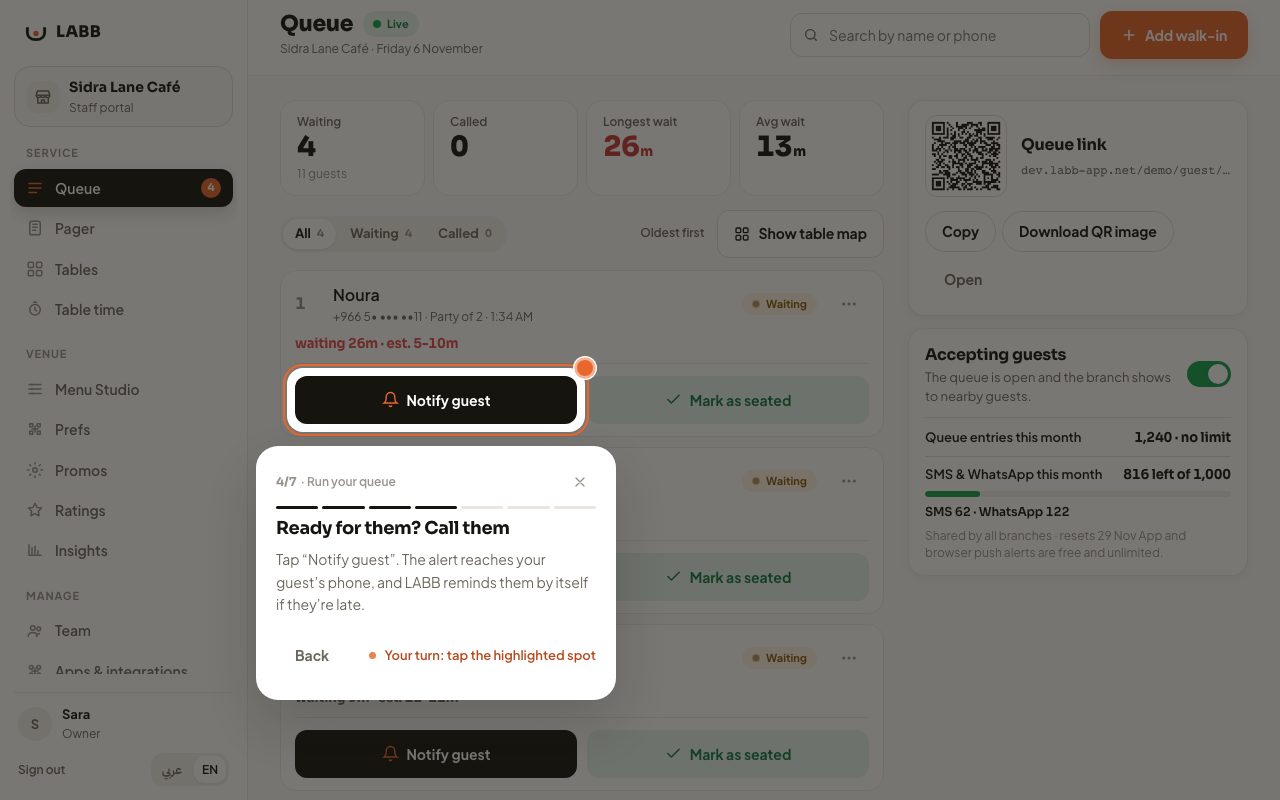
Instead of writing their name on a paper list or standing by the door, your guest scans a QR code, takes a number, and watches their place and wait time update live on their own phone. On the other side, your host runs the whole line from one screen.
How it works
- The guest scans a QR at the entrance. One sticker at the door. They pick their party size and take a number, with no app to download.
- They follow their turn live. A page that updates in real time and tells them honestly how long is left, so they can wait in the car or next door instead of in your doorway.
- You call them when you’re ready. One tap on “Notify guest” and the alert reaches them instantly. If they’re late, LABB reminds them by itself after 3 minutes.
- You mark them as seated. The line moves up and everyone’s expected wait updates.
One screen for the host
- Each party has a card with its name, size, how long it has waited and when its turn is expected.
- Three actions per party: notify, seat, or remove.
- Someone who arrives without scanning? Add them yourself with “Add walk-in”: a name and a phone number.
- When you’re full, pause the queue with one tap and open it again whenever you like.
- Runs on the host’s phone or a tablet. No kiosk, no extra hardware.
Settings that fit your venue
- Location check-in: a radius around the branch, so only guests who are nearby can join the line.
- Wait times you can adjust to how your venue works.
After service
The daily summary builds itself: how many were seated, the average wait, no-shows and peak hours. More in Owner dashboard and reports.
Try the queue yourself in the tour above: call the first party, seat them, and add a walk-in.